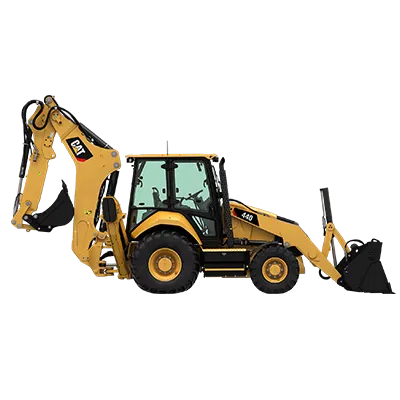
The Caterpillar 420D IT Backhoe Loader is a versatile machine designed for a variety of construction tasks, including excavation, loading, and material handling. Equipped with a powerful engine and advanced hydraulic system, this backhoe loader delivers exceptional performance and productivity on the job site. The spacious cab features ergonomic controls for operator comfort and ease of operation during long work days.
One of the distinctive features of the Caterpillar 420D IT Backhoe Loader is its integrated tool carrier functionality, allowing for quick and efficient attachment changes. The extendible dipper and loader arms provide increased reach and digging depth, enhancing the machine's versatility for different tasks. Built with Caterpillar's renowned durability and reliability, the 420D IT Backhoe Loader is a robust machine that excels in challenging construction environments, making it a valuable asset for construction professionals.

420D IT Problems
- Hydraulic system problems: Common issues with the hydraulic system on the Caterpillar 420D IT Backhoe Loader include leaks in the hydraulic lines, fittings, or seals. Inspect the system for leaks, and replace any damaged components to prevent further leakage.
- Electrical issues: Faulty wiring, blown fuses, or a dead battery can cause electrical problems. Check the wiring for damage, replace blown fuses, and charge or replace the battery as necessary to address electrical issues.
- Transmission malfunctions: If you encounter problems with shifting gears or unusual noises from the transmission, it may be due to low transmission fluid levels or deteriorated fluid quality. Check the fluid level and condition, and top up or replace as needed to resolve transmission malfunctions.
- Engine overheating: Engine overheating can be caused by a dirty radiator, a faulty thermostat, or low coolant levels. Clean the radiator, replace the thermostat if necessary, and ensure proper coolant levels to prevent overheating.
- Error code troubleshooting: If the Caterpillar 420D IT displays error codes, refer to the user manual for a description of each code and recommended troubleshooting steps to address the specific issues indicated by the codes.